Admissions and Records
Getting Started at Fullerton College
Undocumented, AB540 & DACA Students

Fullerton College is an inclusive institution that offers exceptional opportunities to learn, grow, and achieve your goals. It is our hope that your experience here is a formative and fulfilling time for you.
📋 No SSN Required
A Social Security Number is not required to get started. Reporting one is optional.
💰 Financial Aid Available
Qualifying undocumented students can apply for state aid through the California Dream Act Application (CADAA).
📝 AB540 Exemption
You may qualify for in-state tuition through AB 540/SB 68. Complete the form as part of your financial aid application.
🤝 Grads To Be Support
The G2B Program provides dedicated counseling, legal aid clinics, and advising for undocumented students.
Steps to Success
Get started for free on the Get Started at Fullerton College page. Here are some important tips:
Social Security Number
A Social Security Number is not required to get started. Reporting an SSN or Individual Taxpayer Identification Number (ITIN) is optional. If you do not have one or prefer not to provide it, check the box labeled "Check this box if you do not have a Social Security Number or Taxpayer Identification Number, or decline to provide one at this time."
Citizen or Other Status
You will be asked "Citizen or Other Status" and can answer Yes, No, or Unsure, please contact me. This question asks whether your citizenship or other status is one that allows you to establish California residency for tuition purposes.
- If you are undocumented or do not have a current valid immigration status, none of the qualifying categories describe you, so select No. You are still welcome at Fullerton College, and you may qualify for reduced tuition through AB 540 (see Step 2).
- If you are not sure whether your status qualifies, such as a pending application or a status that is changing, select Unsure, please contact me. Admissions & Records will follow up, and it will not hold up your enrollment.
For a full explanation of this question and what happens after you select Unsure, see Understanding the Residency Questions.
High School and Adult School Attended
This section is under Academic History and asks about your graduation status.
- Under Graduation Status, select the option that matches your current or anticipated status: "I have or will graduate with my high school diploma," "I have or will have a high school equivalency like a GED," or "I will not be receiving a high school diploma or equivalent."
- Choose the high school you received, or intend to receive, your diploma from, then enter the month and year you received or expect to receive it. If you are starting before your high school graduation, enter your expected month and year.
California Dream Act Application (CADAA)
Qualifying undocumented students in California can fill out the California Dream Act Application (CADAA) to receive state financial aid. Complete the CADAA and find additional information and FAQs at financialaid.fullcoll.edu/dream-act.
As part of the CADAA, students can also complete the California Non-resident Tuition Exemption Request (AB540/SB68/SB2000).
California Non-Resident Tuition Exemption (AB540 / SB68 / SB2000)
- AB 540 exempts students — including undocumented students — who meet eligibility requirements from out-of-state tuition fees.
- SB 68 expands AB 540 to include adult schools and California Community Colleges (non-credit and credit classes) attendance and other graduation or degree requirements.
Ready to submit your exemption request? Start with the AB540 landing page for instructions, the exemption form, and submission guidance:
Additional AB540 Resources
- Residency & AB540 Requirements — Full eligibility details on the A&R website
- CA In-State Tuition Eligibility Tool — Interactive quiz from Immigrants Rising to check if you qualify
- AB540 Statewide FAQ (PDF) — Comprehensive overview of the exemption and who qualifies
Education Plan & Counseling
Once you have submitted your information to Fullerton College, schedule an appointment with a Grads To Be counselor to develop an educational plan and determine the appropriate courses for your program of study.
Schedule a G2B Counseling Appointment →
Placement
Students must complete the placement process before enrolling in Math, English, Reading, ESL, or Chemistry courses. Visit the Assessment Center and refer to the English, Reading, Math, and ESL Placement Guide for details.
Orientation
Orientation is available online — no appointment needed. It is designed to make your transition to Fullerton College as easy as possible.
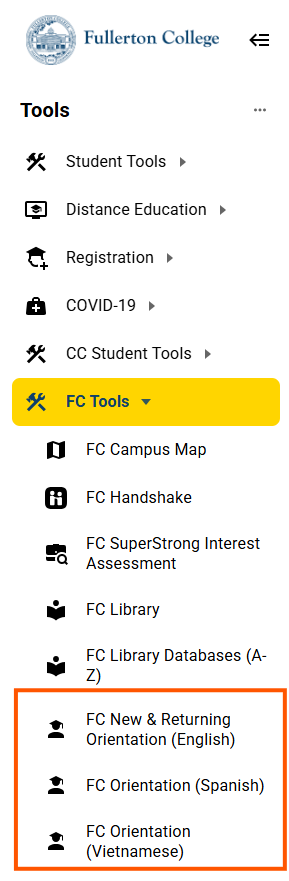
To access the online orientation, log in to myGateway, click Tools, then FC Tools, and select FC New & Returning Orientation, FC Orientation (Spanish), or FC Orientation (Vietnamese).
Register for classes through myGateway at your assigned date and time.
Before Registering
- Verify your email, address, and phone number are correct in myGateway.
- Review the class schedule and plan your courses.
- Clear any holds on your account.
To View Your Registration Date
- Log in to myGateway.
- Click Tools in the top menu.
- Select Student Tools → Student Services.
- Click Registration Appointment Time.
Visit the How to Register page for step-by-step instructions.
The Grads To Be (G2B) Program at Fullerton College supports undocumented students and students with mixed-status families through services that include academic counseling, staff advising appointments, immigration legal aid clinics, workshops, events, and more. G2B is staffed with knowledgeable individuals who can offer students a dedicated space to get support.
Contact the G2B Program
In Person: Building 200, Room 212
Phone: (714) 992-7105
Email: grads2be@fullcoll.edu
Website: grads2be.fullcoll.edu — Sign up for their Newsletter while you're there!